

Game Introduction
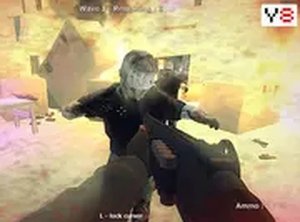
Survival Challenge: Defend the Horde is a free browser-based action game that places you in a 3D environment where you must survive against increasing waves of opponents. Your core objective is to last as many waves as possible, with each wave becoming progressively more difficult. The game uses WebGL technology to deliver smooth graphics directly in your browser without any downloads or installations. It is designed for desktop computers, and a keyboard and mouse are recommended for the best experience. The challenge lies in balancing quick reflexes with careful resource management, as you must decide when to engage and when to conserve your strength. This game offers a straightforward yet engaging experience for players who enjoy testing their endurance and strategic thinking in a fast-paced setting.
How to Play
Players typically use the mouse to aim and click to interact with approaching enemies. Movement around the 3D environment is controlled using keyboard keys. It is important to keep an eye on your resources and collect items and power-ups that appear to help you survive longer. Each wave of opponents becomes tougher, so staying alert and constantly moving is key. The goal is to survive as many waves as possible. The game also offers a full screen mode for a more immersive experience, which can be activated with a button in the game window. Mastering the controls and staying aware of your surroundings are essential for success.
Game Features
This game is free to play and browser-based, requiring no downloads or installations. It features a first-person survival perspective with a theme of overcoming a relentless horde. WebGL technology provides smooth 3D graphics. The game includes a leaderboard where players can compare their survival times, and achievements can be unlocked by meeting specific in-game goals. A full screen mode is available for an immersive experience. The game is optimized for desktop computers, so a keyboard and mouse are recommended. These features combine to offer a clean, accessible, and engaging experience for players looking for a quick challenge.
Tips for Success
To improve your survival time, practice moving and aiming simultaneously to stay mobile while engaging opponents. Prioritize collecting power-ups and items as soon as they appear, as they can restore health or provide temporary boosts. Learn the patterns of different enemy types to anticipate their movements. Conserve your resources by aiming carefully and avoiding unnecessary actions. Finally, stay aware of your surroundings and avoid getting cornered, as opponents can quickly overwhelm a stationary player.








Comments
0 comments